
Seedance 2.5 Character Consistency: Reference Image Workflow
Build a Seedance 2.5 character consistency workflow with reference images, constraint blocks, failure checks, and an A/B test you can run yourself.
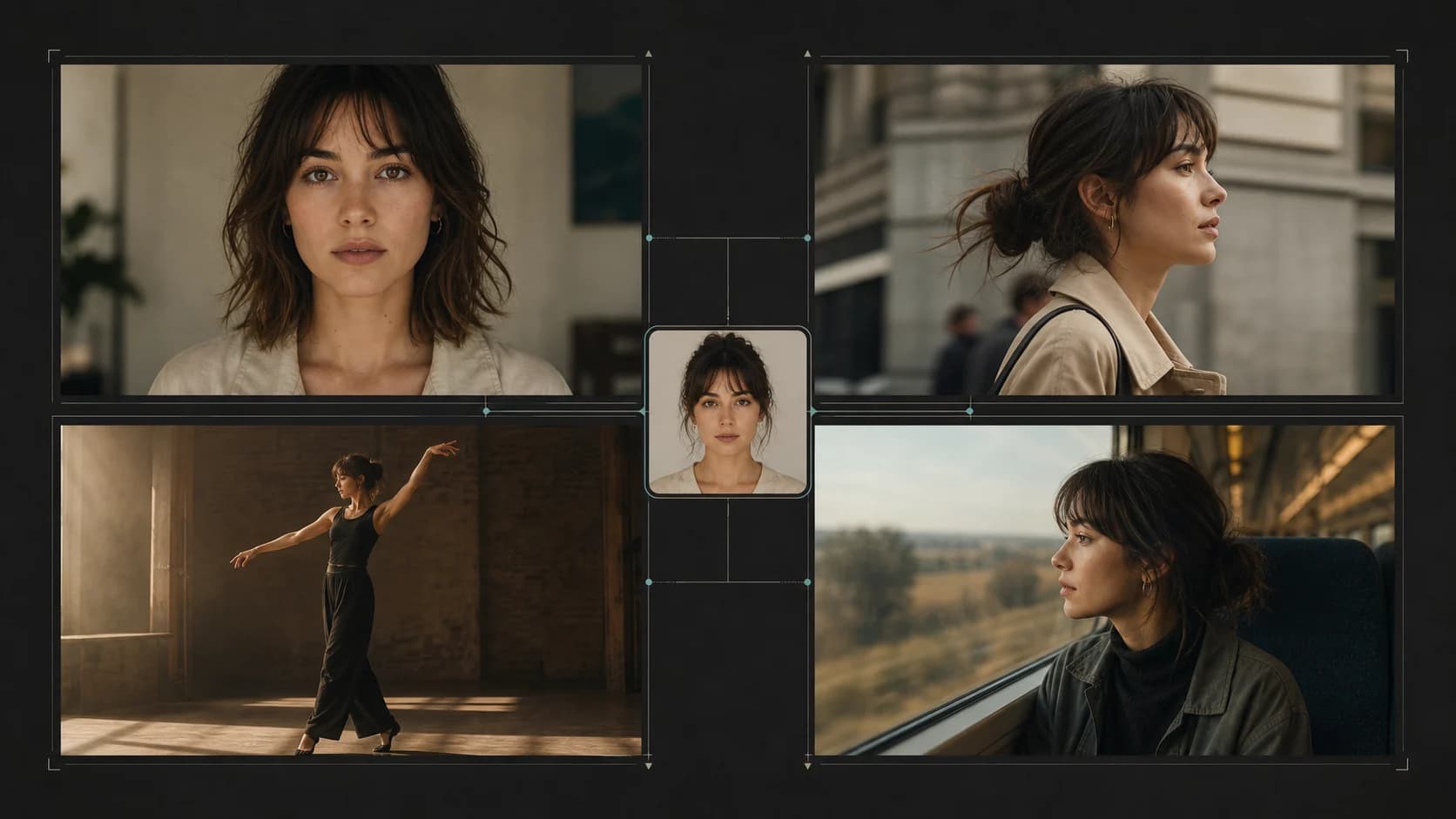
Character consistency is not the same as getting one attractive frame. The real test is whether the same person survives a close-up, a full-body shot, a wardrobe interaction, a change of location, and several cuts without becoming a slightly different character each time.
Two public Seedance 2.5 demonstrations posted on X in August 2026 are useful because their creators disclosed unusually detailed workflows. Synthia described a reference-led performance sequence with multiple shot types. Anissa described a 30-second travel-vlog sequence spanning a full day in Tokyo. Both posts include a video and a written prompt, so they reveal how the creators assigned the reference image and repeated identity constraints.
They are still creator-reported public demonstrations, not controlled tests conducted by ClipDance. We did not receive their original reference images, generation settings, seeds, uncompressed outputs, rejected generations, or edit histories. This article links to the original posts instead of rehosting their media, and uses them to build a testable workflow rather than claiming a benchmark result.
The short version
- Give each reference one explicit job: identity, wardrobe, environment, composition, or motion.
- Write a compact identity block once and keep it unchanged across every generation in the test.
- Separate identity constraints from shot instructions. A camera move should not quietly redefine the character.
- Start with a clean reference set, then add difficulty one variable at a time.
- Judge consistency by facial landmarks, hair, body proportions, wardrobe, and age—not by whether the overall video looks polished.
- Run an A/B batch with identical media and settings. Change only the wording of the reference assignment.
- Treat public X examples as leads and workflow evidence. They cannot reveal selection rate or failure rate unless the creator publishes the whole batch.
What “consistent” should mean before you generate
Decide what must remain fixed. “Same woman” is too vague to score after the output arrives. A practical character lock has five groups:
| Dimension | What to compare |
|---|---|
| Face | eye spacing, nose shape, jawline, lip shape, freckles or other stable marks |
| Hair | length, part, texture, color, hairline, and tied-versus-loose state |
| Body | height impression, shoulder width, limb proportions, and overall build |
| Wardrobe | garment type, color, fit, jewelry, footwear, and deliberate changes |
| Age and presentation | apparent age range, skin texture, makeup level, and grooming |
Style consistency is a different score. A sequence can keep the same grade and lens language while the face drifts. It can also preserve the face while changing a jacket or body shape. Score those failures separately or a strong cinematic look will hide weak identity retention.
If you already have one starting portrait and only need modest movement inside that composition, image-to-video is the simpler route. When a character has to survive new locations, framing, or multiple supporting references, use the reference-to-video workflow and tell the model what every input controls. The Seedance 2.5 studio overview is the place to check the currently available controls before designing a test around a particular duration or input limit.
Public case 1: Synthia’s multi-shot performance sequence
On August 11, 2026, Synthia (@AIwithSynthia) posted a Seedance 2.5 performance demonstration. The creator reports using an uploaded character image as the exact identity reference. The disclosed prompt asks for the same face, eye color, skin tone, hair, makeup, body proportions, outfit, and accessories throughout a music-video sequence.
The requested sequence is a hard consistency problem. It moves from a mirror setup to walking, dancing, lip-sync performance, drumming, close-ups, detail shots, and a final fashion pose. Those actions create occlusion, fast motion, changing camera distance, and many opportunities for the character to drift.
What the input and constraints tell us
The reference has one declared role: define the performer. The prompt then repeats observable identity and wardrobe traits instead of relying on a character name. It also makes unwanted changes explicit: no duplicate performer, face change, outfit change, deformation, or flicker.
That structure is worth copying. The long scene description is not. A reusable lesson is to place a short identity contract before the timeline:
- State which uploaded image defines identity.
- Name a few durable facial, hair, body, and wardrobe anchors.
- Say that the character remains the same person across every shot.
- Put actions and camera directions in a separate sequence block.
What to inspect in the output
Use the close-up, walking shot, dance motion, and prop interaction as four checkpoints. Compare the jaw and eyes in the close-up; proportions and clothing in the walking shot; hairline and face shape during fast movement; then hands, jewelry, and identity during the drumming action. A convincing first and final frame is not enough if the middle changes.
What this post cannot establish
The original character image is not publicly available beside the output, so an independent reviewer cannot calculate input-to-output identity similarity. The post does not disclose seed, resolution settings, generation count, rejected takes, whether any frames were repaired, or whether the uploaded X video was edited. It demonstrates the creator’s reference assignment and presents a claimed result; it does not prove a success rate for Seedance 2.5.
Public case 2: Anissa’s day-in-Tokyo reference workflow
On August 13, 2026, Anissa (@SimplyAnnisa) posted a 30-second Seedance 2.5 travel-vlog demonstration. The disclosed input is a reference image of the main character. The prompt assigns that image to facial identity, hairstyle, facial features, body proportions, and overall appearance, then asks for the same person throughout.
The sequence crosses more environmental variation than Synthia’s example: an apartment, neighborhood streets, a convenience store, a restaurant, an afternoon shopping area, illuminated streets, and a train. It also asks for imperfect handheld framing, autofocus changes, natural reactions, casual conversation, and the feeling of a boyfriend filming an ordinary trip.
Why this is a useful stress test
Location changes can mask character changes because the viewer’s attention follows the new background. The vlog format adds partial profiles, walking shots, crowded scenes, mixed light, and moments when the subject looks away from the camera. That makes it a good pattern for testing whether a reference survives ordinary, non-posed behavior.
The prompt also separates identity from realism. The character definition stays stable, while handheld shake, motion blur, exposure adjustment, and spontaneous reactions define the recording style. Keeping those blocks separate makes debugging easier: if the face changes, you know to revise the identity/reference setup rather than the documentary look.
What to inspect in the output
Capture stills at the apartment, street, restaurant, night street, and train. Put them in a row and compare the same facial landmarks. Then review the moving footage for age drift, changing body build, hairstyle substitutions, bag or outfit changes, and a “reset” after each location transition. Background realism should receive its own score.
What remains unknown
The post does not publicly pair the source reference image with the video, and it does not reveal generation parameters, number of attempts, seed control, platform processing, or post-production. It therefore cannot support a measured claim that identity remained within a particular similarity threshold. As with the Synthia post, it is a creator-reported demonstration with a transparent prompt—not a controlled ClipDance comparison.
An original reference-image prompt template
The template below keeps the useful architecture of the public workflows without copying either creator’s long prompt. Replace the bracketed fields and keep the identity block unchanged across your batch.
[REFERENCE ROLES]
@image1 defines the identity of the main character only.
@image2 defines the outfit only. Do not import its face, body, pose, or setting.
@image3 defines the location and color palette only.

[IDENTITY LOCK — paste unchanged into every test]
The main character is the same person as @image1 in every frame and every shot.
Preserve these stable traits: [face shape], [eye shape/color], [nose and lips],
[skin details], [hairline/style], and [body proportions]. Apparent age remains
within [range]. Do not beautify, age, duplicate, or replace the character.

[WARDROBE LOCK]
Use the [garment, color, material, footwear, accessories] from @image2.
Keep all items unchanged unless a timed action explicitly changes one item.

[FORMAT AND CAMERA]
[duration], [aspect ratio], [recording style]. Use [one camera behavior].
Keep the subject visible enough to verify identity after each transition.

[SEQUENCE]
00:00–00:04 — [simple establishing action, camera distance]
00:04–00:08 — [movement that reveals profile and full-body proportions]
00:08–00:12 — [prop interaction or partial occlusion]
00:12–00:15 — [return to a clear face view for comparison]

[CONTINUITY CHECKS]
The same face, hair, body proportions, wardrobe, and accessories persist across
all beats. Background extras never duplicate the main character. No sudden
makeup, age, skin-tone, costume, or anatomy change. No text or watermark.
Do not load every available reference just because the interface allows it. Start with one strong identity image. Add a second angle only if the first test exposes a specific blind spot, such as a missing profile or unclear full-body proportions. The broader reference images guide explains how character, style, composition, and environment references differ. For longer prompts, the Seedance 2.5 prompt guide is useful for organizing timed beats without making every reference compete for control.
Reference preparation checklist
Before spending a batch, check the inputs:
- You have rights that permit uploading and using every image for AI processing.
- Every identifiable person's likeness is covered by consent or another lawful basis appropriate to your use.
- The face is sharp, unobstructed, and large enough to inspect.
- Lighting reveals the actual eye, hair, and skin color instead of tinting them.
- A full-body reference is included only when body proportions or wardrobe matter.
- Multiple images show the same intended identity, age, hairstyle, and outfit state.
- Each reference has one written role in the prompt.
- Crops do not hide a feature you later expect the model to invent accurately.
- Logos, unrelated people, and busy background objects are removed when they are not part of the target.
- The identity block is saved separately so its wording does not drift between shots.
- Duration, aspect ratio, audio, and output settings are recorded before generation.
Common failure modes and the first fix to try
The face changes after a cut. Reduce the number of cuts, return to a clear face view after the transition, and keep the identity block exactly the same. Do not compensate by adding more style adjectives.
The face holds but the body changes. Add one clean full-body reference and name body proportions in the identity lock. A headshot cannot reliably define details it does not show.
Wardrobe details migrate or disappear. Give wardrobe its own reference role. Avoid asking one image to control the face, clothing, environment, and composition at once.
The character becomes a polished look-alike. Remove beauty language and ask to preserve stable skin details, apparent age, jaw shape, and asymmetry. “Photorealistic” alone does not mean identity-accurate.
A supporting person inherits the main face. State that background characters are distinct and must not share the main character’s facial traits, hair, or clothing.
Consistency drops during fast action. Test the identity with slower motion first. Once that passes, add speed while keeping every other variable fixed. The batch workflow in Why Seedance 2.5 Footage Comes Back Almost Right is helpful when you need cuttable options instead of one fragile take.
How to run your own A/B validation
One polished result tells you very little. Run a small comparison that another person could repeat.
- Choose one 10–15 second scene with a close-up, profile, full-body movement, and final clear face view.
- Freeze model, route, reference image, duration, aspect ratio, resolution, audio setting, scene prompt, and seed if the interface exposes one.
- Generate Batch A three to five times with the same reference image and a neutral assignment:
@image1 defines the main character. - Generate Batch B the same number of times with that image plus the explicit identity-lock block. Change nothing else.
- If you want to test a second reference angle, call that Batch C. Do not silently add it to B.
- Export stills at matching timecodes. Have at least two reviewers score face, hair, body, wardrobe, age, and transition stability from 1 to 5.
- Record unusable generations as failures. Do not compare only the best A output with the best B output.
- Save prompts, input hashes or filenames, settings, generation IDs, dates, and whether any edit or upscale was applied.
Report both quality and reliability. “Four of five runs kept the same jawline and hairstyle through all four checkpoints” is more useful than “the character was very consistent.” Also report the tradeoff: a stronger identity lock may reduce pose freedom, exaggerate details from the reference, or make the scene less varied.
The two X posts above are good starting points precisely because they expose the creators’ instructions. Their missing variables show why your own A/B record matters. Use public demonstrations to form a hypothesis; use controlled batches to decide whether the workflow is reliable for your character.
References
- Synthia (@AIwithSynthia). “Seedance 2.5 handling complex prompts with ease.” Creator-reported public demonstration posted August 11, 2026. View the original X post.
- Anissa (@SimplyAnnisa). “Made with Seedance 2.5.” Creator-reported public demonstration posted August 13, 2026. View the original X post.
Author

Categories
More Posts
Why Seedance 2.5 Footage Comes Back Almost Right
Seedance 2.5 footage that comes back almost right is a prompt-structure problem. Here is the batch workflow that returns cuttable coverage, not near-misses.
50 Seedance 2.0 Camera Movement Prompts to Copy-Paste
A copy-paste list of 50 camera movement prompts for Seedance 2.0: dolly, orbit, crane, and tracking shots grouped by use case, plus mood and speed modifiers.
Seedream 5.0 Complete Guide: 5.0 Lite, API, Commercial Use, and Nano Banana Pro Comparison
A practical guide to Seedream 5.0 and Seedream 5.0 Lite with release timeline, official access points, API notes, commercial use checklist, and model comparison.