
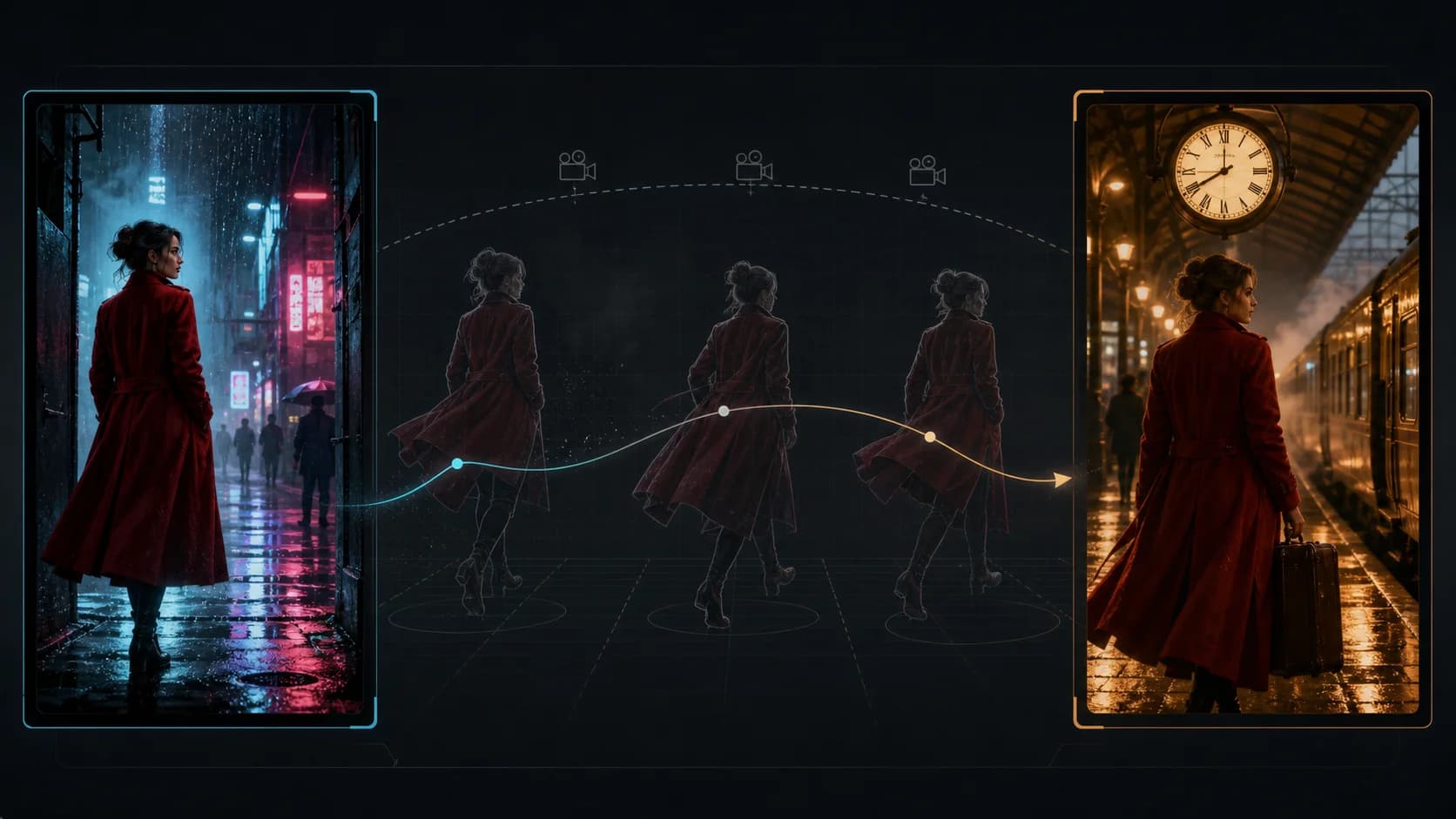
Seedance 2.5 First and Last Frame Prompt Workflow
Build a Seedance 2.5 first-and-last-frame prompt that connects two images with a clear path, stable physics, controlled camera motion, and a reproducible test.
A good Seedance 2.5 first and last frame prompt does not spend most of its words describing the two uploaded images. The model can already see them. The prompt should explain the missing part: what changes between the opening and closing compositions, which subject follows which path, what physical event causes the change, and how the camera observes it.
On ClipDance, this workflow uses the First + Last Frame image-to-video mode. The first frame is required and the last frame is optional. If both are supplied, the output is asked to travel from the opening image toward the ending image. The endpoint is a target, not a promise of pixel-for-pixel reconstruction, so the route between the images must still make visual sense.
This guide covers the controls that are actually available in the current ClipDance route. It does not assume access to unreleased editing tools or hidden upstream features.
Quick answer
- Open Image to Video, select Seedance 2.5, and choose First + Last Frame.
- Upload one first frame. Add a last frame only when the ending composition matters.
- Use images with the same aspect ratio and compatible subject identity, scale, lighting, and environment.
- Write the prompt in four parts: endpoint mapping, motion path, physical rules, and camera behavior.
- Choose a duration from 4 to 30 seconds and either 480p or 720p.
- The aspect-ratio control is intentionally unavailable in this mode. The video inherits its shape from the first image.
- Test at least three runs with unchanged inputs before treating one successful clip as a repeatable workflow.
What the current Seedance 2.5 route supports
ClipDance exposes two image modes for Seedance 2.5: First + Last Frame and Multi-Reference. They solve different problems. Multi-Reference supplies appearance or content references. First + Last Frame supplies a starting composition and, optionally, a destination composition.
| Control | Current First + Last Frame behavior | What it means for the prompt |
|---|---|---|
| First Frame | Required, one image | Defines the opening composition and output aspect ratio |
| Last Frame | Optional, one image | Defines the desired endpoint when the shot must arrive somewhere specific |
| Prompt | Required | Describe the transition and visible action, not just the images |
| Duration | 4–30 seconds | Give the action enough time to reach the endpoint without rushing |
| Resolution | 480p or 720p | Use 480p for cheap structural tests and 720p for review-ready attempts |
| Aspect ratio | Adaptive and hidden in this mode | Prepare the first image in the intended landscape, square, or vertical format |
There is no separate aspect-ratio decision after the first image is uploaded. If the first image is 16:9, the generation follows that format. A last frame with a conflicting crop forces the shot to solve both motion and reframing at once. Crop the endpoint images before uploading rather than asking the prompt to repair their geometry.
Using only the required first frame leaves the ending open. Add the optional last frame when a product, character, vehicle, or clip handoff must reach a planned composition.
A public final-frame example, with its limits
Marco “Shikoba” Riccetti published a Seedance 2.0 and Seedance 2.5 comparison on August 12, 2026. The creator described the clips as using the same prompt and the same endpoint reference through Pollo AI. The accompanying prompt identifies the uploaded image as the final frame: a man seen over his shoulder beside an empty parking space. The requested path has a giant robot fall into the scene, land, and transform into a sports coupe before the composition reaches that reference.
The cause-and-effect chain and specific destination make this useful to inspect: Does the falling mass affect the scene? Does the robot retain enough geometry to make the transformation readable? Does the car arrive naturally? Does the camera approach the endpoint gradually or snap to it?
It is not a ClipDance test. We did not generate the footage, inspect native exports, receive the source image, or reproduce the settings. The post is labeled as a paid partnership and was made through a third-party platform, which may apply its own processing. It cannot establish typical success rate or universal model superiority. The published prompt is in the creator's reply.
For a broader review of this and two other public comparisons, see three Seedance 2.0 vs Seedance 2.5 same-prompt tests.
Prepare two endpoints the model can connect
The easiest endpoint pair shares a stable visual world. The same subject appears in both images, objects do not switch design, and the ending could plausibly follow the beginning. Every difference creates work for the transition.
Before writing the prompt, compare the frames in this order:
- Identity: Is the person, product, vehicle, creature, or location clearly the same? If a face, logo, or small prop changes between images, the output may spend the shot morphing between two designs.
- Screen position: Mark where the main subject begins and ends: left to right, background to foreground, standing to seated, open to closed, or one scale to another.
- Camera relationship: Decide whether the subject moves through a stable camera, the camera moves around a stable subject, or both move. Avoid making all three axes change without a reason.
- Environment: Check horizon height, floor plane, major architecture, shadows, time of day, and weather. A sunny opening and a night endpoint need a visible time or lighting transition.
- Aspect and crop: Export both images at the same aspect ratio. Place important details away from an edge that disappears in the other frame.
A large visual difference can work when the prompt names a causal path. “Transform smoothly” gives less structure than “the four side panels unfold on hinges, lock into a rectangular chassis, then the wheels rotate outward and contact the floor.”
Write the prompt in four layers
1. Map the endpoints
State what must remain the same and what visibly changes. Do not redescribe every color and texture already present in the files.
Start exactly from the first uploaded frame. Preserve the courier's identity,
yellow jacket, bicycle design, wet street, and storefront geometry. End at the
last uploaded frame with the same courier and bicycle in their shown positions.
2. Define one continuous path
Write an ordered chain of actions that connects the two states. Use verbs that can be seen: rolls, turns, opens, steps, unfolds, lands, lifts, or stops. Keep the number of beats appropriate for the selected duration.
The courier pedals from the far-left background toward the storefront, slows
beside the curb, dismounts on the sidewalk side, then rolls the bicycle forward
by the handlebars until it reaches the final position.
If the route matters, name it. “Moves to the door” leaves collision avoidance and screen direction undefined. “Follows the curb from left background to right foreground without crossing the parked car” gives the motion a usable path.
3. Add physical constraints
Describe interactions, support, weight, and continuity—not merely “realistic physics.”
Both bicycle wheels remain in contact with the road until the dismount. Tire
rotation matches forward travel. The bicycle slows before the courier's foot
touches the pavement. Rainwater splashes outward from the tires and settles;
the bicycle never passes through the curb or the courier's body.
4. Lock the camera
One clear camera plan usually produces a more coherent path than a list of cinematic adjectives.
One continuous eye-level shot. Slow dolly right to follow the courier, with no
cuts, orbit, zoom, whip pan, or viewpoint jump. Ease the camera to a stop during
the final second so the composition settles into the last uploaded frame.
The final hold matters. If every second contains action, the model may delay the endpoint and rush into it. Reserve the closing second for stabilization when visual alignment is more important than another beat.
Copy-ready first and last frame prompt template
This template is original and deliberately plain. Replace the brackets, then delete any line that does not apply.
FIRST FRAME
Begin from the first uploaded image. Preserve [subject identity], [wardrobe or
product design], [important props], and [environment geometry].

LAST FRAME
Arrive naturally at the last uploaded image. The same [subject] ends at
[screen position, pose, scale, and orientation]. Preserve [details that must
not change]. Hold the endpoint composition steady for the final [1–2] seconds.

ACTION PATH — IN ORDER
1. [First visible action and direction of travel.]
2. [Physical interaction or state change that causes the next beat.]
3. [Approach to the final position.]
4. [Small settling action before the final hold.]

PHYSICS AND CONTINUITY
[Feet, wheels, or object] stay in contact with [supporting surface]. [Moving
part] follows [specific route]. Weight, momentum, shadows, reflections, and
environment reactions remain consistent. No teleporting, object penetration,
duplicated parts, identity replacement, or unexplained design change.

CAMERA
One continuous [camera height and framing] shot. [Single camera movement].
Maintain [screen direction / horizon / axis]. No cuts, sudden zoom, orbit,
viewpoint jump, or last-second reframing.

AUDIO (OPTIONAL)
[Ambient sound and timed effects]. No dialogue or music unless requested.
For longer prompt structures and other generation modes, use the Seedance 2.5 prompt guide. Do not paste every advanced instruction into a simple endpoint shot. The best prompt is the shortest one that removes the ambiguity causing your failure.
Choose duration by path complexity
A 4-second generation suits one small motion. Use 6–10 seconds for two or three connected beats and 12–20 seconds for a longer route. Add length only when the visible path needs it; extra time can also allow more drift. Start structural tests at 480p, then move to 720p after the action order, camera, and endpoint approach are stable.
Common failure modes and the first fix
The video ignores the last frame. Reduce the number of intermediate actions, reserve a final hold, and state the ending position before decorative style instructions. Check that both images show the same subject and compatible scene geometry.
The last frame appears as a sudden snap. Give the final approach its own beat. Describe the subject entering the final position, then slow the camera and action before the endpoint.
The subject morphs throughout the shot. Align identity, clothing, product details, and proportions in both source images. Explicitly list the few details that must persist; do not try to correct conflicting source designs with adjectives.
The camera invents cuts or an orbit. Ask for one continuous shot and one camera movement. Remove phrases such as “dynamic montage,” “multiple angles,” or “epic cinematic camera” when endpoint alignment is the priority.
Objects pass through each other. Name the support surface, contact point, route, and collision to avoid. Split a complex interaction into fewer beats.
The aspect ratio is wrong. Fix the first image before generation. In this mode, ClipDance keeps aspect adaptive and inherits the first frame's shape; there is no separate ratio override.
The result reaches the endpoint but feels lifeless. Add one motivated secondary effect—cloth settling, water displacement, tire suspension, dust, reflected light, or ambient sound—after the main path works. Do not add several new events at once.
Run a reproducible endpoint test
One attractive generation does not tell you whether the workflow is dependable. Use a small fixed batch:
- Save the exact first and last image files. Record filenames and file hashes if the result will inform a production decision.
- Fix model, mode, prompt, duration, resolution, audio setting, output format, and seed when used.
- Generate at least three runs without changing anything. Keep failed runs rather than selecting only the best result.
- Review the opening, 25%, 50%, 75%, and closing frames. Score identity, path accuracy, physical contact, camera continuity, and endpoint match from 1 to 5.
- Record whether the ending arrives progressively or through a late snap. Note the first timecode where identity or geometry changes.
- Change one variable only. Test a revised prompt separately from a new crop, duration, or seed.
- Keep native exports for review. Social-media uploads and comparison edits can change sharpness and timing.
An endpoint score should be specific. Instead of “looks close,” record whether subject scale matches, left-right orientation is correct, hands and props are present, the horizon stays level, and major background lines arrive in the right places. Report the number of usable runs as well as the strongest clip.
Rights and disclosure checklist
Only upload images you may use for AI processing. Obtain appropriate permission for identifiable people, private locations, trademarks, artwork, and product assets. A public X post may be embedded and credited; it is not automatic permission to download and rehost the video.
When showing someone else's result, name the creator, link the original post, retain paid-partnership or creator-program disclosures, and describe it as creator-reported unless you reproduced the test yourself. Do not write “our test” when your evidence is a third-party upload. If a generated person could be mistaken for a real event or endorsement, label the synthetic context clearly.
Frequently asked questions
Is the last frame required in Seedance 2.5 image-to-video?
No. ClipDance requires one first frame in First + Last Frame mode; the last frame is optional. Without it, the model invents the ending. Add it when you need a planned endpoint.
Can I choose 16:9 or 9:16 after uploading the first frame?
Not in this mode. The aspect setting stays adaptive and the output inherits the first image's aspect ratio. Crop the first frame to the intended format before uploading, and prepare the last frame to match.
Does the final video reproduce the last image exactly?
Treat the image as a visual endpoint to approach, then inspect the output. Do not assume pixel-level identity. Compatible endpoint images, a simple path, and a settled final second make meaningful alignment easier to achieve and measure.
Sources
- Marco “Shikoba” Riccetti (@shikoba_86), Seedance 2.0 vs Seedance 2.5 same-prompt and same-endpoint comparison, August 12, 2026. The post is labeled as a paid partnership.
- Marco Riccetti's published final-frame prompt, August 12, 2026.
Author

Categories
More Posts
Seedance 2.0 Path Control is basically AI Quidditch FPV now with a prompt
Learn the community Seedance 2.0 path-control workflow using a marked reference image, waypoint prompt, FPV demo, and practical fixes for route drift.
Where to Use Seedance 2.5: Dreamina, Higgsfield & More
Seedance 2.5 just debuted globally on Dreamina, Higgsfield still lists it as coming soon, and the API is pre-launch. A verified map of where to run it today.
Seedream 5.0 Complete Guide: 5.0 Lite, API, Commercial Use, and Nano Banana Pro Comparison
A practical guide to Seedream 5.0 and Seedream 5.0 Lite with release timeline, official access points, API notes, commercial use checklist, and model comparison.