
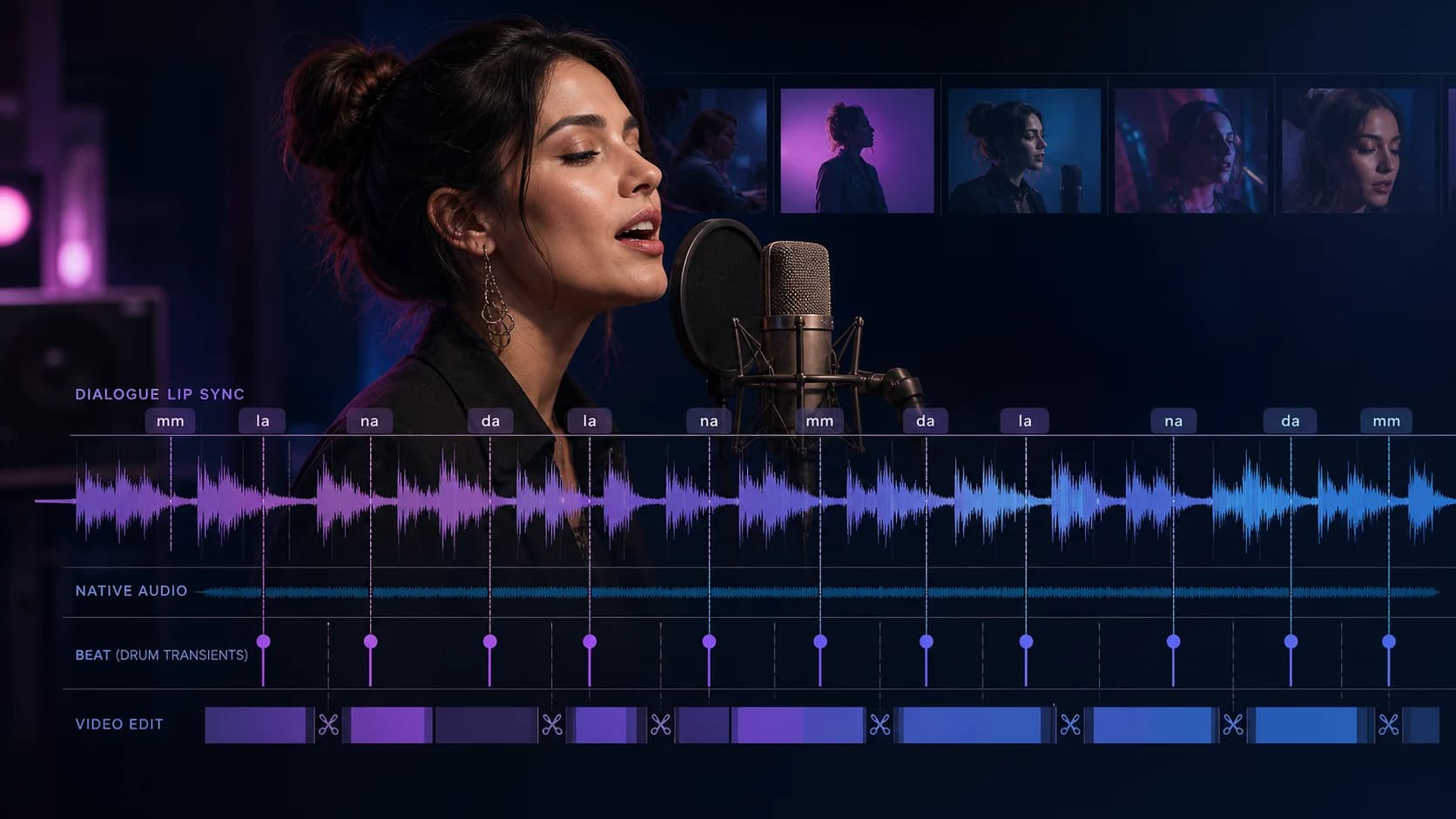
Seedance 2.5 Native Audio and Lip-Sync Prompt Guide
Write Seedance 2.5 prompts for dialogue, lip-sync, and music videos, then verify the soundtrack, mouth timing, beat alignment, and common failures.
Seedance 2.5 can generate video and audio in one request, but that does not make every talking or singing clip synchronized. A useful prompt separates four jobs: dialogue, soundtrack, visible timing, and camera framing.
This guide is for three related intents: Seedance 2.5 native audio, lip-sync prompts, and music-video prompts. It uses the controls currently available on ClipDance rather than assuming that every capability described in a public demo exists in every product. ClipDance is an independent third-party platform, not a ByteDance product.
The short answer
- The current Seedance 2.5 generator exposes text-to-video, image-to-video, and reference-to-video at 480p or 720p for clips from 4 to 30 seconds.
- Native audio is enabled by default. The prompt can ask for speech, sound effects, ambience, and background music; put the exact spoken line in double quotation marks.
- The current reference workflow accepts image, video, and audio material. On this platform it allows up to 10 WAV or MP3 audio files, with each file between 2 and 30 seconds and all reference audio combined capped at 30 seconds.
- An audio reference can guide a result, but it is not a promise of exact voice cloning, exact lyric delivery, or sample-accurate beat matching.
- Seedance 2.5's current model selector does not expose a dedicated beat-sync mode. If an existing track must drive the edit, keep it as the master and conform exported shots to it in a video editor.
- Judge speech timing, musical timing, and sound effects separately. A clip can succeed at one and fail at another.
What “native audio” means in this workflow
Generated native audio starts from the prompt. You enable audio and describe the dialogue, ambience, effects, or music you want. The output arrives with an audio track generated alongside the picture. This is the right path for an original line of dialogue, a new soundscape, or a soundtrack described by genre and energy.
Reference audio starts from an uploaded WAV or MP3 in reference-to-video. Treat it as direction for pace, tone, rhythm, or atmosphere. Do not describe it as a forensic voice clone or assume every word in the reference will be reproduced. If the exact recorded performance must survive unchanged, the safe production workflow is to keep that recording as the master track and edit the generated picture against it afterward.
Track-led editing starts from an existing track whose timing is the central constraint. The current Seedance 2.5 selector does not expose a dedicated beat-sync mode. A prompt can request “cuts on strong downbeats” or “motion follows the chorus energy,” but the reliable workflow is to generate the visual shots and align the approved exports to the master track in an editor.
“Generate an original Y2K rap-pop soundtrack” and “cut precisely to this uploaded song” are different requests. The first creates both sides of the audiovisual event; the second obeys a fixed external timeline.
What the Smiling Khan example actually shows
On August 13, 2026, Smiling Khan (@AIwithkhan) published a Seedance 2.5 post with a public prompt and a video. The supplied inputs included a storyboard and character images. The prompt repeatedly requested lip-sync, beat-synced editing, and an original Y2K rap/pop soundtrack.[1]
It is a useful creator-reported prompt example: the request assigns visual references, names a music style, and repeats timing requirements where they matter. It is not an independent benchmark. We did not analyze its audio track or measure mouth shapes frame by frame. The post omits the actual lyrics, seed, complete settings, and original export. It shows what the creator requested and shared; it does not prove perfect lip-sync, exact beat alignment, or reproducibility.
The lesson worth keeping is procedural: a music-video prompt should make the performer, line, musical section, action, and camera observable. The lesson to reject is that repeating “perfect lip-sync” can guarantee a perfect result.
A practical observation framework
Review the first generation as evidence, not as a mood board. Score each dimension separately from 0 to 2: 0 means unusable, 1 means close but needs another pass, and 2 means usable for the intended delivery.
| Dimension | What to inspect |
|---|---|
| Dialogue | Are the requested words present, intelligible, and in the intended order? |
| Mouth timing | Do visible mouth openings and closures broadly follow the syllables? Check at normal speed and again at 0.5×. |
| Voice continuity | Does the perceived voice remain stable when the shot or camera scale changes? |
| Musical structure | Is there a readable intro, lift, drop, chorus, or ending rather than an undifferentiated loop? |
| Edit rhythm | Do major cuts and gestures land near the named accents or only feel generally energetic? |
| Sound grounding | Do footsteps, impacts, doors, or object sounds occur near the visible event? |
| Visual continuity | Do the character, wardrobe, setting, and screen direction survive across shots? |
| Mix clarity | Can dialogue be understood without the music masking it? Are there sudden level jumps? |
A stylish clip with an unreadable lyric fails the lip-sync test. A clean speaking shot whose cuts drift from the chorus fails the music-edit test.
Prompt template 1: generated dialogue with original music
Use this when the soundtrack and voice can both be newly generated. Keep the spoken or sung line short enough to fit naturally inside the shot.
FORMAT: 9:16 music-video performance, 10 seconds, one featured performer.

CHARACTER: A confident young singer in a silver cropped jacket and dark cargo pants.
Keep the same face, hairstyle, jacket, and jewelry throughout the clip.

SCENE: Nighttime convenience-store parking lot, wet pavement, cyan and amber signs.

PERFORMANCE AND CAMERA:
0–2s: medium shot, performer looks into camera as the instrumental begins.
2–7s: slow push-in while the performer sings, with the mouth clearly visible.
7–10s: camera arcs to a three-quarter angle; one hand gesture lands on the final accent.

VOCAL: The performer sings exactly: "Neon on my jacket, midnight in the rearview."
Clear English delivery, moderate tempo, one voice only.

MUSIC: Original Y2K-inspired rap-pop instrumental, bright synth hook, tight dry drums,
no imitation of a named artist or existing song. Keep the vocal above the music.

AUDIO EVENTS: faint traffic ambience and one shoe step when the hand gesture lands.
No subtitles, no extra lyrics, no crowd voices.
This is testable because the line is explicit, the face stays visible, only one voice competes, and the final gesture provides a timing marker.
Prompt template 2: storyboard, character references, and audio direction
Use reference-to-video when identity and shot design matter. Assign one job to each asset instead of uploading a pile of references and expecting the model to infer their roles.
Use @Image1 for the performer's face and hair.
Use @Image2 for the silver jacket and accessories.
Use @Image3 as a three-panel storyboard: parking lot wide shot, medium performance,
and final profile pose. Follow that order, but render a continuous finished video.
Use @Audio1 only as a reference for tempo and vocal energy; do not copy a real identity.

Create a 12-second original rap-pop performance.
0–3s: wide establishing shot, instrumental intro.
3–9s: medium close-up. The performer says exactly:
"We made our own light when the whole block went dark."
Keep both lips visible, use one speaker, and keep the music below the line.
9–12s: cut to the storyboard's profile pose on the final drum accent.

Maintain the same face, hairstyle, wardrobe, and lighting across all three beats.
Generate original music and ambience. No extra dialogue, captions, logos, or sampled song.
The upstream model can accept audio-only reference input, but the current ClipDance reference form requires at least one image or video alongside the audio. For character-led lip-sync, a clear face or storyboard also makes the result easier to evaluate. See the consistent voice workflow for voice-reference limits.
Edit plan 3: an existing song is the master
When you have rights that permit using the final track, do not ask native generation to reinvent it. Mark the audible landmarks in an editor, generate short visual shots without replacement music, and conform the approved exports to that timeline.
Use the licensed audio as the master track in the editing timeline.
Vertical performance video with one recurring character from the supplied portrait.
Hold the opening close-up through the first two bars.
Cut to a low-angle walk on the first strong downbeat.
Change to a wide shot at the chorus entrance.
Land the final turn on the last accent, then hold the final frame.
No generated dialogue and no replacement music.
The current Seedance 2.5 selector has no dedicated beat-sync mode. Generate shots through its available modes, then align them to the licensed master track in your editor. The existing Seedance 2.0 music-video guide covers track preparation and longer multi-clip production in more depth.
How to verify dialogue, soundtrack, and rhythm
- Write the expected timeline first. Mark the first word, line ending, chorus entrance, and one visible action.
- Run a short proof first. Test the hardest line or transition in a short clip before spending credits on a 30-second arrangement. Keep the character, prompt, resolution, and references stable between comparisons.
- Listen without watching. Confirm the words, speaker count, structure, distortion, and mix. Plausible audio can still say the wrong line.
- Watch muted. Mouth movement should look intentional even without audio. Look for frozen lips, random chewing motion, a mouth hidden exactly when speech begins, or a sudden face change.
- Review together at normal speed. The delivery has to work for a viewer, not only under frame-by-frame inspection.
- Review again at 0.5×. Inspect the start and end of phrases, plosive closures, hard cuts, impacts, and the final pose. Slow review reveals drift that energetic music can hide.
- Use an editor timeline. Compare waveform transients with cuts or gestures. This validates the output; it does not prove sample-accurate generation.
- Change one variable per retry. Shorten the line, reduce the cast, simplify the music, or change the camera—but not all four at once.
Common failure modes and the smallest fix
The words are unclear. Shorten the line, specify one speaker and moderate tempo, and hold a medium or medium-close view.
The soundtrack masks the vocal. Ask for “one lead voice, vocal above music, restrained instrumental during the line.” Move the instrumental lift after the last word instead of demanding a loud chorus under dialogue.
The edit is energetic but off-beat. Name three observable accents in the prompt. When a fixed track is the master, conform the exported shots to its waveform in an editor.
The face changes between performance shots. Reduce the number of characters, reuse the same character image, keep wardrobe text identical, and avoid switching from an extreme wide to an extreme close-up during a short lyric. More reference files are not automatically better; conflicting identity or lighting references can weaken the brief.
The voice changes mid-clip. State “one speaker only,” fix the language and register, and do not mix narration, singing, and crowd responses. Audio reference does not guarantee identity-level cloning.
Sound effects arrive late or appear without a visible cause. Tie each effect to an object and moment: “the shoe hits the puddle at 8 seconds; one splash is heard at contact.” Remove decorative sound requests until the key event works.
The model adds extra lyrics or captions. Put the only permitted line in quotes, then add “no extra dialogue, no subtitles, no on-screen lyrics.” This reduces ambiguity; it is still a request, not a deterministic constraint.
A production rule that saves retries
Choose one synchronization problem per generation: face and dialogue, beat and movement, or ambience and continuity. Join approved clips afterward rather than asking one render to solve dialogue, choreography, six cuts, a song, three characters, and a product reveal. Start with the smallest observable test, preserve what worked, then expand it in the Seedance 2.5 generator.
Frequently asked questions
Does Seedance 2.5 generate audio with video?
Yes on the current ClipDance route. It is enabled by default and can include requested speech, effects, ambience, and music. Review intelligibility, timing, and mix balance.
Does Seedance 2.5 guarantee perfect lip-sync?
No. A prompt can specify a short quoted line, language, tempo, camera framing, and visible mouth, which makes the result easier to generate and judge. None of those instructions guarantees perfect phoneme timing.
Can I upload a voice or music reference?
The current reference route accepts WAV and MP3 audio references, but its form requires at least one image or video alongside them. Treat a voice reference as creative direction unless the product explicitly promises a different use. Upload only recordings and music under rights that permit this AI-processing workflow.
Should I use native audio or beat-sync for a music video?
Use native audio when you want Seedance 2.5 to create an original soundtrack and picture together. When an existing licensed track must remain the timing master, generate visual shots without replacement music and conform the approved exports to that track in an editor.
References
- Smiling Khan (@AIwithkhan). Public Seedance 2.5 creator example with storyboard and character inputs, a complete prompt requesting lip-sync, beat-synced editing, and an original Y2K rap/pop soundtrack. Published August 13, 2026 on x.com/AIwithkhan/status/2087754389624860911. The post does not disclose its actual lyrics, seed, complete settings, or original export; this article treats it as a creator-reported example, not an independently measured benchmark.
Author

Categories
More Posts
Happy Horse 1.0 vs Seedance 2.0: Which AI Video Model Should You Use?
Happy Horse 1.0 vs Seedance 2.0 compared on quality, API access, references, audio, cost, and the best workflow for each AI video model.
Midjourney to Video with GPT Image 2 and Seedance
The three-model Midjourney to video workflow: build the look in Midjourney, rebuild it as a controlled board in GPT Image 2, then animate it in Seedance.
Midjourney V8 Character Consistency Without --cref
Midjourney character consistency changed at V8: the official chart marks --cref as unsupported. What replaced it, and the workflow teams ship around it.